Through the online Regis College center for student services, students have direct links to all the platforms required for their school work. Regis College Moodle login, RegisAccess and their Outlook Web Email are just a few of the most popular portals for students. If you want to sign into the Regis Moodle and you’re not sure how to get started, our guide will walk you through every step of the process.
Furthermore, we have provided a section dedicated to login assistance for the Regis College Moodle if you can’t access your account. Even more so, we will teach you how to sign into RegisAccess and your student email address. Our guide ends with a list of all the contacts you require if you ever want to speak one-on-one to a college representative. Find out how to sign into these platforms and more below.
Regis College Moodle Login Walkthrough
Moodle and Starfish are the software solutions that Regis College uses for online learning with students. Both of them are accessed through the same Regis College Moodle login page, which can be reached through the official website of the college. To get into your Moodle or Starfish account, you must have cookies enabled in your browser. In addition to this, you need a username and password registered with the software. Follow these steps for instant access:
- Connect to the Regis College Current Students page.
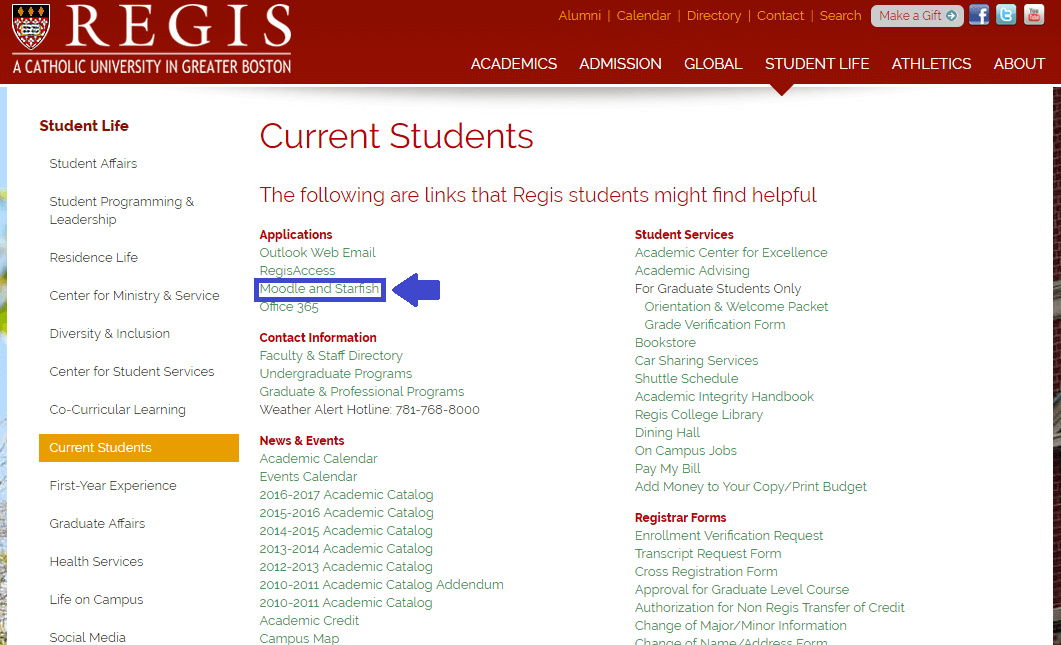
This is the link that redirects you to the Regis College Moodle login page.
- Click the Moodle and Starfish link under the Applications heading.
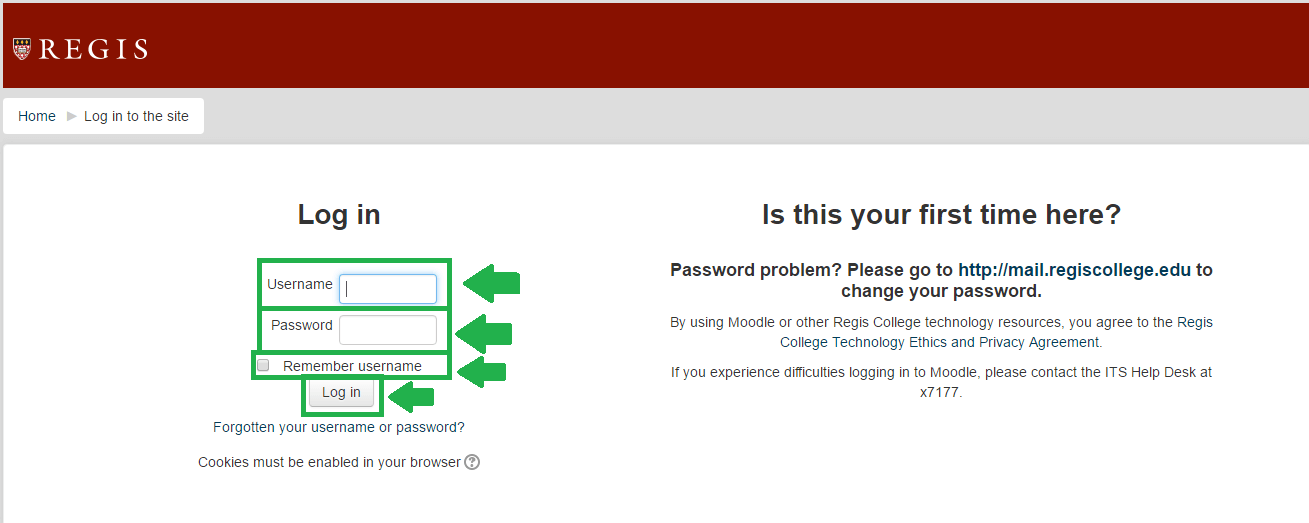
These are all the boxes you need to complete in order to finish Regis College Moodle login.
- Work with the Log in box on the left half of the screen. Start with your Username.
- Enter your Password after that.
- Click the box next to Remember username if you’re on a personal device. Leave it unchecked if on a public or shared computer.
- Press the grey Log in button to reach your Moodle account.
RegisAccess Sign In Instructions
To connect to RegisAccess, all you need is a User ID and a password that represent your account. The RegisAccess login portal can be accessed from the same Regis College website with similar steps. Also, the login instructions for RegisAccess are a lot like those for Regis College Moodle login. Find out how to sign into your account below:
- Go to the Regis College Current Students home page.
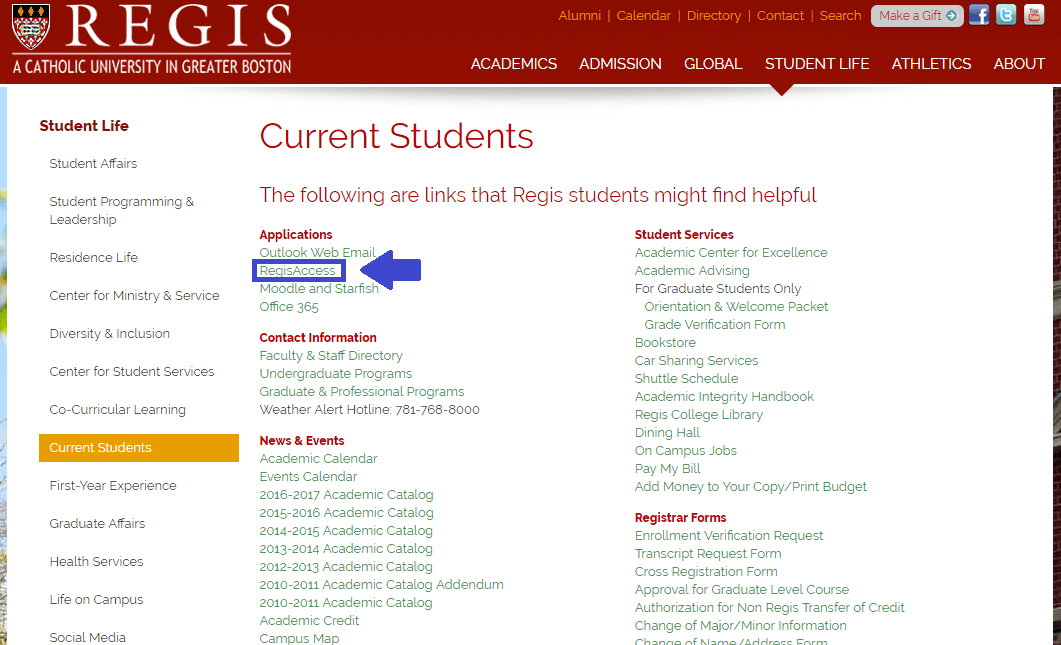
This is what the RegisAccess link looks like.
- Search under the Applications heading for RegisAccess. It is the second option on the list.
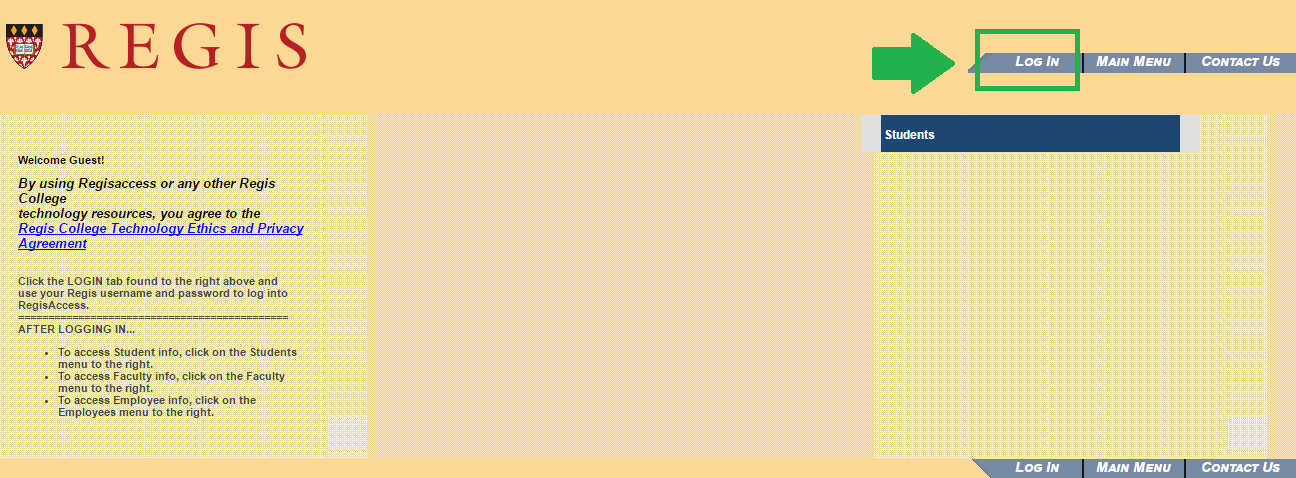
This image shows what the RegisAccess button looks like.
- Read any information that you’re not aware of on this page.
- Press the Log in button highlighted in the image above.
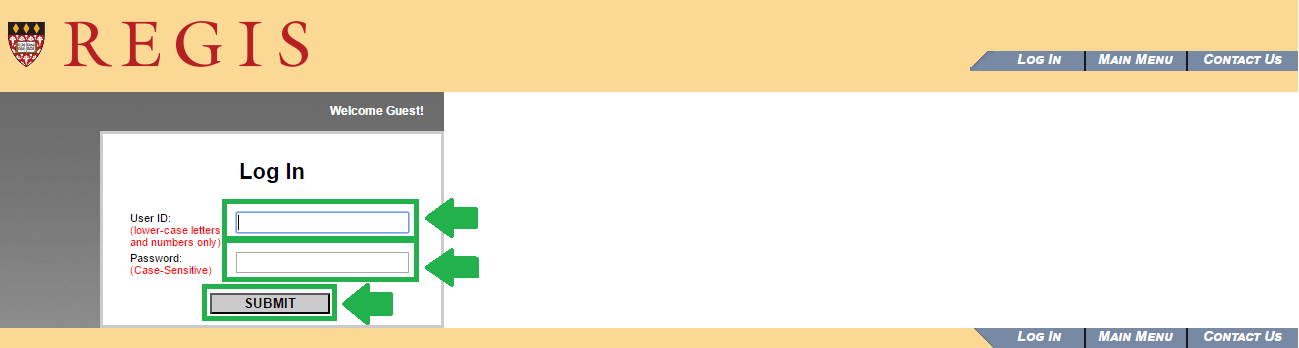
This is what the RegisAccess login process appears like.
- Type your User ID. Use only numbers and lower case letters.
- Enter your Password. Please note that RegisAccess passwords are case sensitive.
- Click the grey Submit
Regis College Email Login Steps
The student webmail that Regis College offers is hosted by Outlook Web Email. As a result, if you have ever had an Outlook account in the past, you will know how to log in. However, even if you’re new to the email provider, you’ll see that it just takes about two minutes to sign in. Make sure that you have your user name and password prepared. Follow these steps when you’re ready:
- Access the Current Students page on the Regis College website.
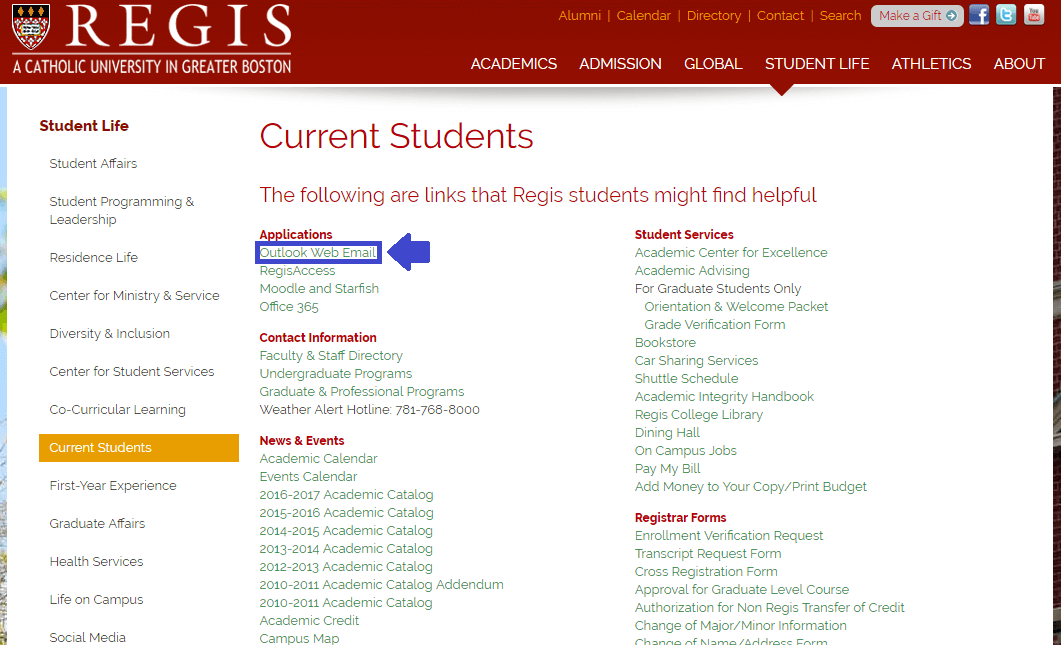
This is the link you need to use to get to the Outlook Web Email page.
- Read the info on this page and click the blue Login to Email button to get to the Outlook sign in page.
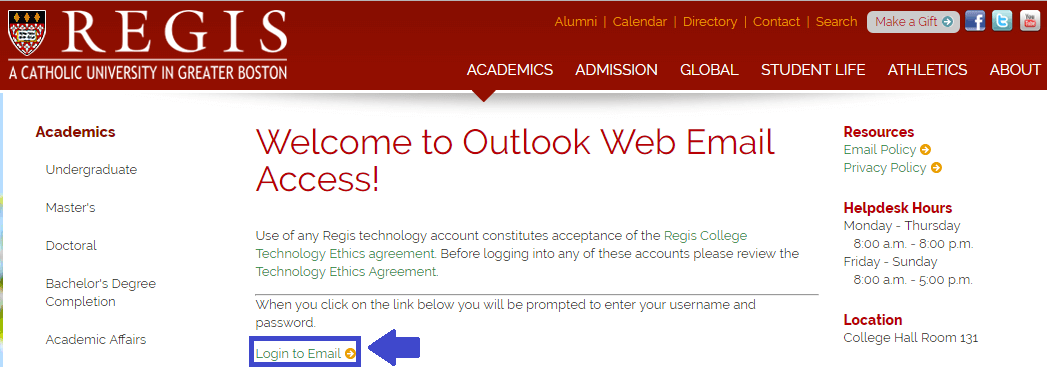
This link is used to reach the email login page after you have read any messages from the school.
- Select the first link from the Applications heading – Outlook Web Email.
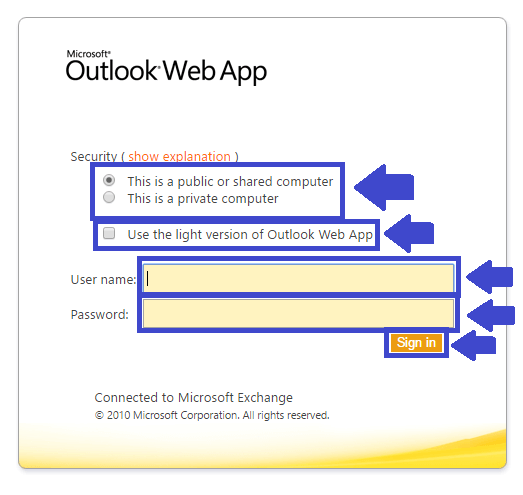
The student email login portal looks like this screenshot.
- Choose whether the device you’re signing in from is public or private.
- Check the box next to Use the light version of Outlook Web App if this is what you’d like.
- Enter your User name.
- Write the Password connected to your Regis College email account.
- Push the orange Sign In
Regis College Moodle Login Help
If you can’t remember your Regis College Moodle login credentials, you can get your username or password back on the same page. However, you do need to have your student email login info nearby. The reason is that your password reset is carried out through your Outlook email address. If you don’t have access to your email either, get in touch with the school for custom help. For most cases, follow these instructions:
- Go to the Regis College Moodle login page.
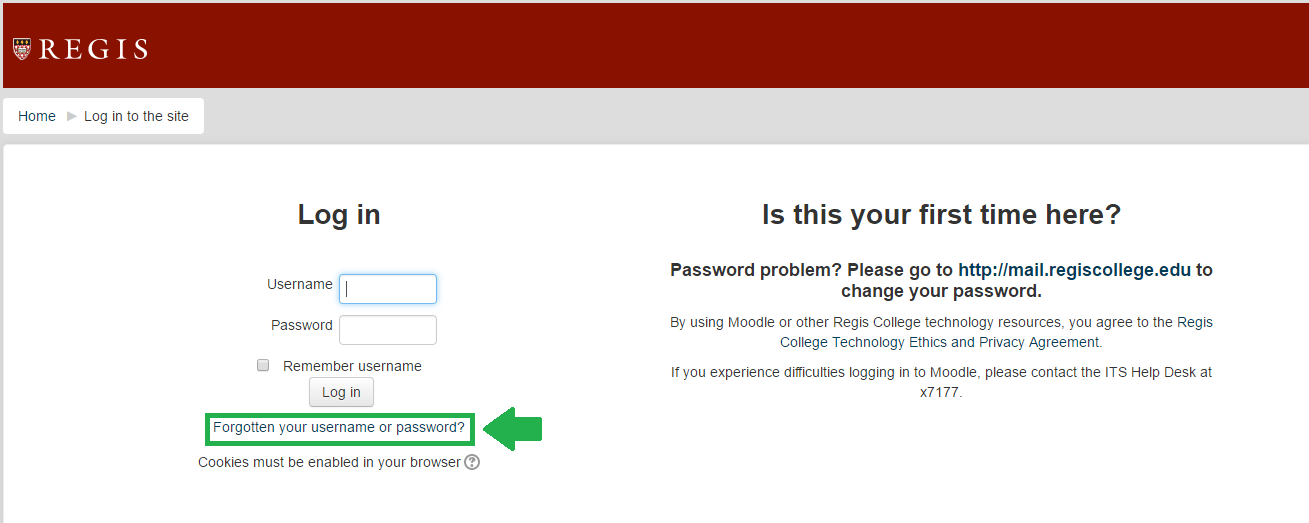
This is the link you have to click to start regaining account access.
- Click the Forgotten your username or password?
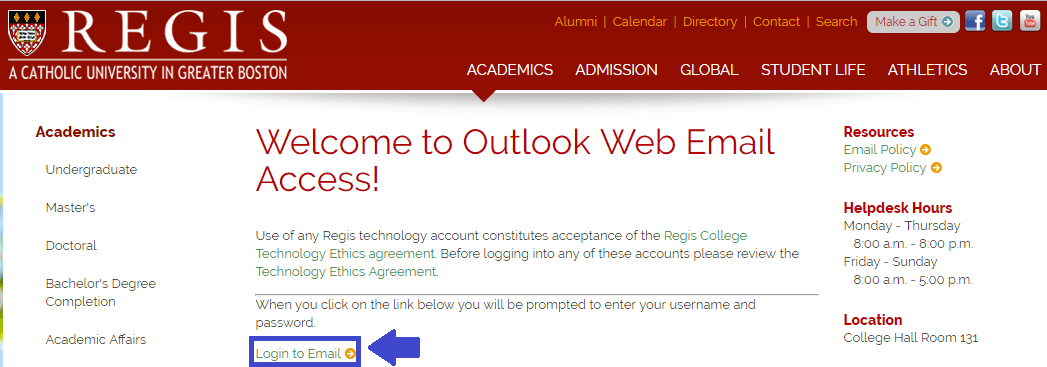
Sign into your email account to reset your password for Moodle.
- Click Login to email after you read the message from the school.
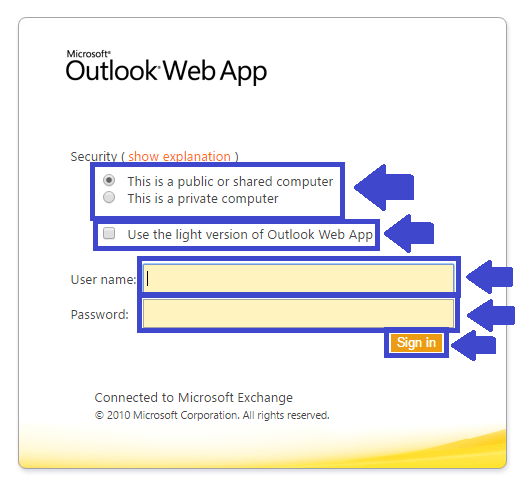
Fill out all of these fields to access your email and recover your Moodle account.
- Sign into your email account following the steps from the previous section of our guide.
- Follow the steps that help you recover or reset your Regis College Moodle login credentials.
Regis College Address, Phone Number, Email & Hours
It’s easy to get in touch with a Regis College representative, through the contact method of your choice. Firstly, a phone call will help with direct communication. If you want to contact the Helpdesk, dial 781 768 7177 (ext. 7177 on campus) or 781 768 7344. If you’re at the school, you can visit College Hall Room 131 for face-to-face assistance. The email address for this department is: helpdesk@regiscollege.edu. No matter how you choose to contact them, please note that the Helpdesk hours of operation are:
Monday – Thursday: 8:00 a.m. – 8:00 p.m.
Friday – Sunday: 8:00 a.m. – 5:00 p.m.
For admissions and general inquiries, you can call 781 768 7000. Alternatively, write an email to admission@regiscollege.edu. You can also use their online contact form, if preferred. Papers and other mail can be sent to:
Regis College
Box 1021
235 Wellesley Street
Weston, MA 02493
Please visit the official Regis College website for any other information you’re looking for.
Leave a Reply